Notifications
Learner
/
Notifications
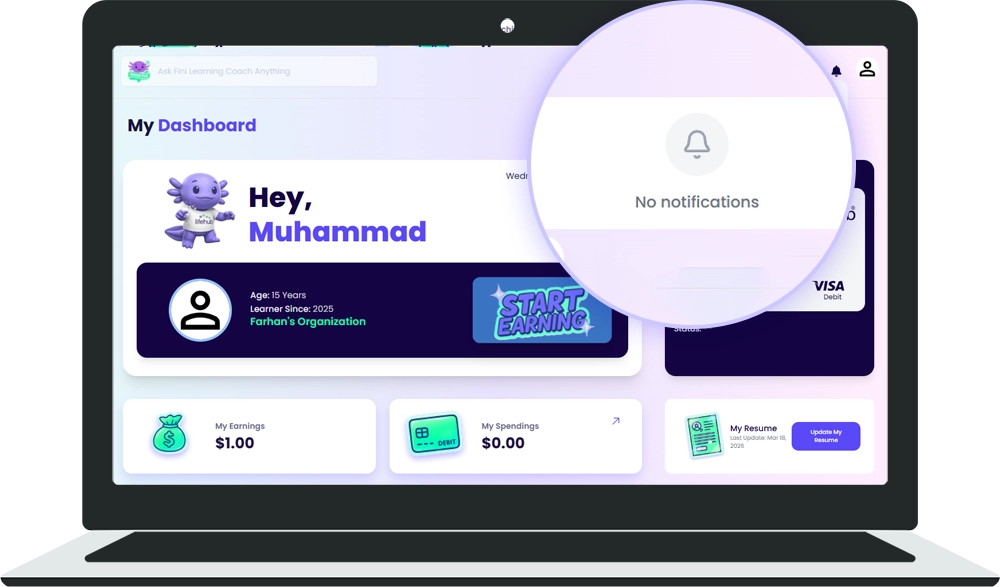
Notifications keep you informed about important activity in Life Hub.
Notifications keep you informed about important activity in Life Hub.
Notification Bell Icon
The bell icon appears in the top navigation bar.
🔹 Quick Access - Click the bell anytime to view your recent notifications
🔹 New Alerts Badge - When you have new notifications, a badge appears on the bell
🔹 Always Available - The notification bell is visible on every page
Viewing Your Notifications
🔹 Click the bell icon in the top navigation
🔹 A dropdown menu appears showing your recent notifications
🔹 Click any notification to jump to the relevant page or action
Tips
💡 Check your notifications regularly to stay updated
💡 Click notifications to go directly to relevant pages in the app

%201.avif)

Ready to Chat about Life Hub?
Whether you're a parent, teacher, or partner—there’s a path for you.

.svg)

.svg)


.svg)
.svg)

.svg)