Messages and Technical Support
Learner
/
Messages
Stay connected with your organization and get help when you need it through the Messages section and Technical Support inbox.
Stay connected with your organization and get help when you need it through the Messages section and Technical Support inbox.
Messages
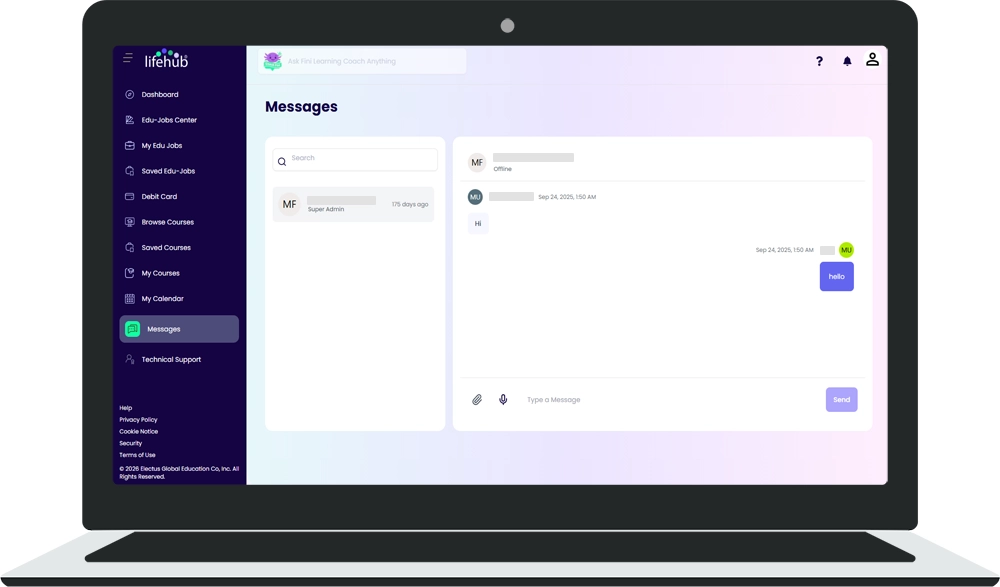
The Messages page (/en/messages) is where you communicate with your organization's admin and support staff.
Finding Your Conversations
🔹 Search Bar - Use the search bar at the top to quickly find specific conversations by contact name or topic
🔹 Conversation List - Your active conversations appear as a list below the search bar
🔹 Contact Details - Each conversation shows the contact's avatar or initials, their name, and their role (for example, "Organization Admin")
🔹 Recent Activity - The time since your last message appears next to each conversation so you know which ones are most recent
Opening a Conversation
🔹 Message Bubbles - Your messages appear on the right, while replies from your organization appear on the left
🔹 Chat View - You can see the full conversation history
🔹 Text Input - Type your message in the text box at the bottom
🔹 Send Button - Click the send button to submit your message
Who You're Messaging
Your messages are only between you and your organization's support team. This is the best place to ask questions about your account, edu-jobs, earnings, or anything specific to your organization.
Technical Support Inbox
The Technical Support inbox (/en/messages?type=support) is separate from regular Messages. Use it to report technical issues directly to the Life Hub support team.
Accessing Technical Support
Click the "Technical Support" tab or navigate to the technical support section from the Messages area.
Technical Support Features
🔹 Search Bar - Search through your technical support requests
🔹 Support Conversations - View any open or resolved technical issues you've reported
🔹 New Requests - Start a new request if you're experiencing a bug or technical problem
Empty State
If you haven't reported any technical issues yet, you'll see:
🔹 "No new messages" - Your technical support inbox is empty
🔹 "No conversations found" - No active technical support tickets
When to Use Technical Support
Contact Technical Support for:
🔹 App crashes or bugs
🔹 Login issues
🔹 Payment or earnings not appearing correctly
🔹 Calendar or edu-job display problems
🔹 Any other technical malfunction
For general questions about edu-jobs or your account, use the regular Messages section to contact your organization instead.
Help and Chatbot Support
Help Icon in Navigation
Click the ? icon in the top navigation bar to open a help request form. This provides quick access to common help topics and allows you to submit questions directly.
Fini Learning Coach Chatbot
The "Ask Fini Learning Coach Anything" bar appears at the top of every page in Life Hub.
🔹 Always Visible - The Fini Learning Coach bar is available on every page
🔹 Click to Interact - Click or type in the bar to interact with the AI chatbot
🔹 Future Feature - Fini functionality is currently being developed

%201.jpg)

Ready to Chat about Life Hub?
Whether you're a parent, teacher, or partner—there’s a path for you.

.svg)

.svg)


.svg)
.svg)

.svg)